Hub
@devframes/hub orchestrates many devtools sharing a UI: a dock registry, terminal aggregation, message/toast queue, and command palette. It ships no UI; hub UI providers provide their own atop the hub's RPC + shared-state protocol.
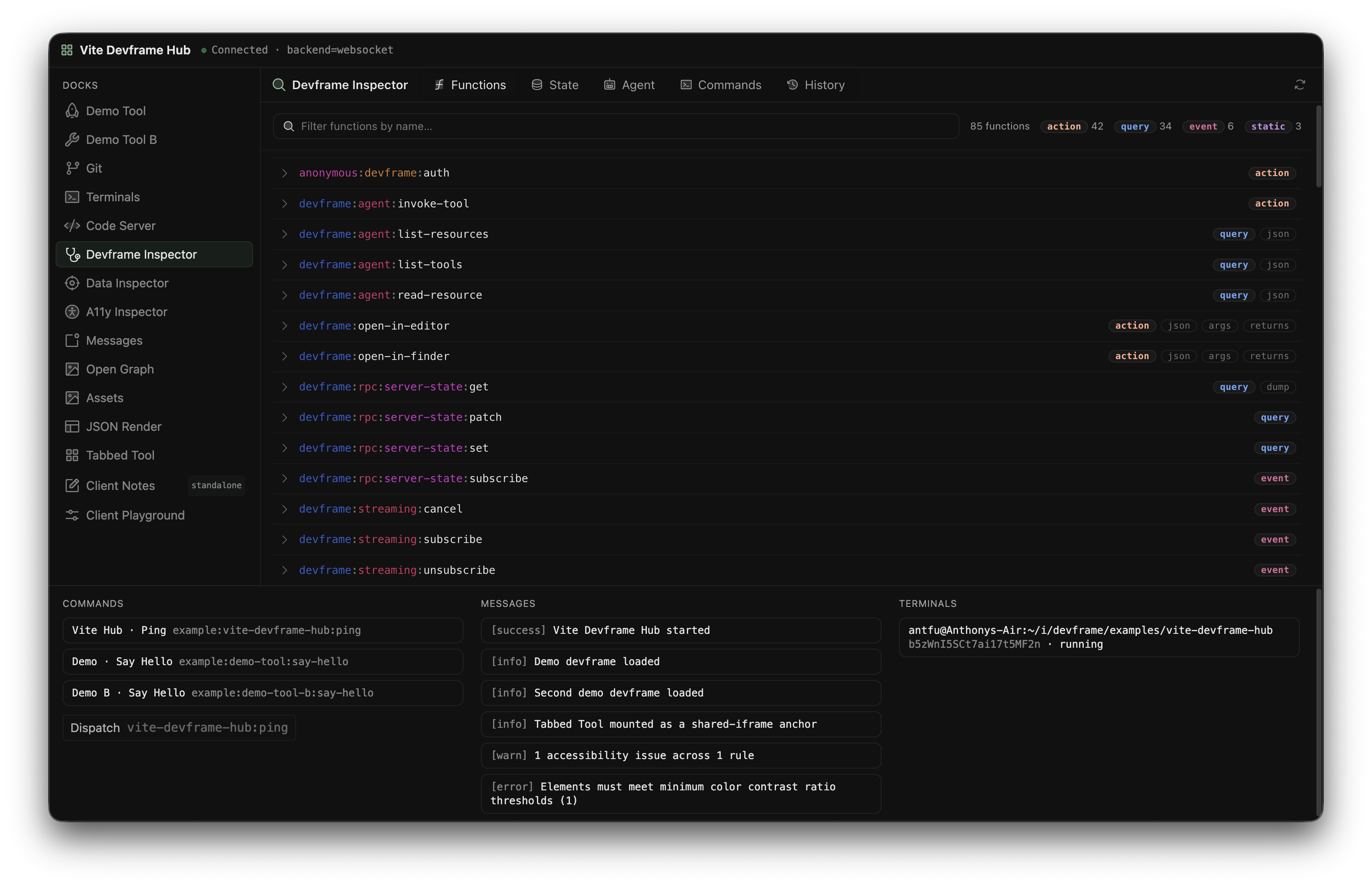
Orchestrating multiple devtools (from A Playground)
What the hub adds
DevframeHubContext adds four subsystems to DevframeNodeContext: ctx.docks registers dock entries and groups and activates docks; ctx.terminals aggregates terminal sessions with streaming output (Terminals); ctx.messages is the server-side toast/notification queue; ctx.commands is the hierarchical command palette with keybindings and when clauses. Each subsystem's API is in the Hub API reference.
Data-driven UI panels are an opt-in JSON-Render package (a json-render dock type).
Built-in RPC
Every hub context auto-registers these functions, callable from any RPC client:
hub:commands:execute: invoke a server command by id.hub:docks:activate: switch the active dock (Cross-iframe dock activation).hub:messages:add/update/remove/clear: write the messages feed.hub:terminals:write/resize: drive a PTY session by id.
Host-framework-specific capabilities (open in editor, reveal in finder) ship as kit-registered functions.
Commands as agent tools
A server command with an agent field (agent-consumable API) becomes a ctx.agent MCP tool:
ctx.commands.register({
  id: 'app:build',
  title: 'Run build',
  agent: {
    description: 'Run the production build. Call after config or dependency changes to verify the app still builds.',
    args: [v.object({ configFile: v.optional(v.string()) })],
  },
  handler: (opts?: { configFile?: string }) => runBuild(opts),
})
args takes positional Standard Schema schemas (a single v.object(...) unwraps into the input); omit for zero-arg. safety defaults to 'action'; when clauses are unenforced for agent calls.
Localized titles
A dock entry, a command, and a launcher each carry a plain title and an optional titleLocales map of translations by BCP 47 tag. The plain title stays the default, so a hub UI that ignores the map still shows it. The reference hub UI picks the translation closest to its own language setting (zh-HK falls back to zh-TW, pt-PT to pt-BR, en-GB to en):
ctx.docks.register({
  type: 'iframe',
  id: 'app:build',
  title: 'Build',
  titleLocales: { 'zh-CN': '构建', 'ja': 'ビルド' },
  icon: 'ph:hammer-duotone',
  url: '/__build/',
})
A devframe localizes the dock a hub synthesizes for it through dock: { titleLocales } in its definition. A hub UI provider resolves a title with resolveTitle(entry, locale) from @devframes/hub/client.
Nested commands
A command's children nest arbitrarily deep. The palette drills into each level, and every command in the tree is bindable at any depth: a shortcut assigned to a leaf several levels down fires as directly as one on a top-level command, and each appears as its own row under Settings → Shortcuts, indented by nesting level.
ctx.commands.register({
  id: 'app:cache',
  title: 'Cache',
  children: [
    { id: 'app:cache:clear', title: 'Clear', keybindings: [{ key: 'Mod+Shift+K' }], handler: clearCache },
  ],
})
Set showInPalette: 'without-children' on a parent to keep its whole subtree out of root search while leaving it reachable by drilling down.
Set allowShortcuts: false for commands that require arguments from their caller. The hub UI hides their shortcut settings and ignores default and saved bindings. Explicit calls through ctx.commands.execute(id, ...args) remain available. This option is independent of showInPalette and applies to each command individually, including nested commands.
Cross-iframe dock activation
A mounted devframe's iframe uses hub:docks:activate to switch the active dock.
// From inside a mounted devframe's iframe (its own RPC client):
await rpc.call('hub:docks:activate', {
  dockId: 'devframes_plugin_terminals',
  params: { sessionId }, // opaque bag the target dock interprets
})
It mirrors into the devframe:docks:active shared-state slot; the terminals dock reads params.sessionId, unknown ids no-op (DF8107). Server-side: ctx.docks.activate(dockId, params?).
Process-control launchers
A type: 'launcher' dock entry is a one-click action tile. Three optional launcher fields make it a live process controller: command binds a command id dispatched via hub:commands:execute, terminalSessionId links a tracked session for a "view in terminal" action, and digest shows the latest progress line inline (Hub API reference).
onLaunch lets a same-process host framework invoke directly; provide command, onLaunch, or both.
ctx.commands.register({ id: 'app:build', title: 'Run build', handler: runBuild })

const launcher = ctx.docks.register({
  type: 'launcher',
  id: 'app:build',
  title: 'Build',
  icon: 'ph:hammer-duotone',
  launcher: { title: 'Run build', command: 'app:build', status: 'idle' },
})

async function runBuild() {
  const session = await ctx.terminals.startChildProcess(
    { command: 'vite', args: ['build'] },
    { id: 'app:build-session', title: 'vite build' },
  )
  launcher.update({ launcher: { title: 'Run build', command: 'app:build', status: 'loading', terminalSessionId: session.id } })

  // A child-process session keeps its `status` live: `running` → `stopped` on a
  // clean exit, `error` on a non-zero exit or spawn failure. Map it onto the
  // launcher and read the exit code from getResult().
  const { exitCode } = await session.getResult()
  launcher.update({ launcher: {
    title: 'Run build',
    command: 'app:build',
    terminalSessionId: session.id,
    status: exitCode === 0 ? 'success' : 'error',
    error: exitCode === 0 ? undefined : `vite build exited ${exitCode}`,
  } })
}
Mounting a devframe into a hub
ctx.install(def) registers a DevframeDefinition as a dock and runs its setup(ctx), the imperative counterpart to initHub's devframes list.
import { createHubContext } from '@devframes/hub/node'

const ctx = await createHubContext({ cwd, host, mode: 'dev' })
await ctx.install(myDevframe)
Framework kits and hub UI providers wrap this (e.g. @vitejs/devtools-kit's createPluginFromDevframe).
Connecting embedded SPAs
A mounted SPA loads at /__<id>/ and calls connectDevframe(), which fetches ./__connection.json, served by the host framework's mountConnectionMeta(base):
const host: DevframeHost = {
  mountStatic(base, distDir) { /* serve files */ },
  mountConnectionMeta(base) {
    // serve `${base}__connection.json` → { backend: 'websocket', websocket: port }
  },
  resolveOrigin() { /* … */ },
  getStorageDir(scope) {
    // workspace = committable, team-shared; project = per-checkout; global = per-user
    if (scope === 'workspace')
      return join(cwd, '.devframe')
    if (scope === 'project')
      return join(cwd, 'node_modules/.my-hub')
    return join(homedir(), '.my-hub')
  },
}
Omitting mountConnectionMeta (with servable clientAssets) triggers DF8106 and falls back to same-origin inheritance.
Bundled host frameworks (Next.js)
Load node-side built-in devframe packages via dynamic import() with webpackIgnore/turbopackIgnore comments:
const pkgs = ['@devframes/plugin-git', '@devframes/plugin-terminals']
const defs = await Promise.all(
  pkgs.map(p => import(/* webpackIgnore: true */ /* turbopackIgnore: true */ p)),
  // Each package's default export is its `create<X>Devframe` factory, not a
  // pre-built instance; call it to get one.
).then(mods => mods.map(m => m.default()))

for (const def of defs)
  await ctx.install(def)
SPAs serve at /__<id>/ with relative assets; set skipTrailingSlashRedirect:
/** next.config.mjs */
export default { skipTrailingSlashRedirect: true }
Duplicate devframes
When a devframe shares an already-mounted id, duplicationStrategy decides: 'warn' (the default) keeps the first and drops the later with DF8105, 'silent' drops it quietly, 'throw' raises, and 'duplicate' lets every instance coexist under disambiguated dock ids (Hub API reference).
defineDevframe({
  id: 'my-tool',
  /** … */
  duplicationStrategy: 'duplicate',
})
Grouping dock entries
Related dock entries collapse under one dock-rail button (a type: 'group' entry); an entry whose groupId matches the group's id joins it.
ctx.docks.register({
  type: 'group',
  id: 'nuxt',
  title: 'Nuxt',
  icon: 'logos:nuxt-icon',
  category: 'framework',
  defaultChildId: 'nuxt:overview', // optional; see "Activating a group" below
})

ctx.docks.register({
  type: 'iframe',
  id: 'nuxt:overview',
  title: 'Overview',
  icon: 'ph:gauge-duotone',
  url: '/__nuxt-overview/',
  groupId: 'nuxt', // joins the group above
})
Group and members stay independent top-level entries in devframe:docks. Grouping affects the dock rail, not iframes; to share one soft-navigated iframe, give docks a shared frameId and mark the anchor with subTabs (Shared-iframe soft navigation).
Activating a group
Activating a group resolves to one of its members.
The dock rail button reopens the member last opened in the group (remembered per tab), then defaultChildId; with neither, it reveals the member popover.
A group command, activated by its keyboard shortcut or a command-palette pick, opens that same remembered or default member, then the only visible member when there is exactly one. With several visible peers and no preferred member, it opens the command palette scoped to those members, so the choice stays with the user. Pressing the same shortcut again closes that palette.
The first time any member of a group opens in a session, the hub also loads the group's defaultChildId member, then navigates to the requested member. A group that mixes server and client docks therefore always mounts its default member, even when the last opened member is a server dock.
hub:docks:activate follows programmatic dock switching: it opens the remembered or default member, then the first registered member.
Declare defaultChildId when one member is the natural landing spot; leave it off when the members are peers.
The dual role of category
category (ordered by DEFAULT_CATEGORIES_ORDER, default 'default') sets an ungrouped entry's outer dock-rail bucket. A grouped entry takes its outer bucket from the group's category, and its own category becomes an in-group sub-category; a member whose groupId never resolves renders top-level under its own category.
Known categories
DEFAULT_CATEGORIES_ORDER (from @devframes/hub, /node, /client, /constants) names the default buckets, running from framework (weight -100) through default, app, ui, data, web, performance, advanced, and docs to ~builtin (always last). The weight table is in the Hub API reference.
Framework kits can interleave category ids or override weights; an unknown category sorts as 0.
The hub UI protocol
A hub UI provider imports no hub classes; it renders from four shared-state slots and dispatches through two RPC methods. The slots are devframe:docks (every registered dock entry), devframe:commands (the serializable command list), devframe:user-settings (persisted hub settings), and devframe:docks:active (the most recent dock activation request); the methods are hub:commands:execute and hub:docks:activate. Types and payloads are in the Hub API reference.
Broadcast notifications (devframe:docks:activate, devframe:terminals:updated, devframe:messages:updated) arrive via rpc.client.register(...); the client runtime registers devframe:docks:activate for you (Events Reference).
Running a devframe's code in the host page
The hub ships a headless client runtime, createDevframeClientRuntime() (@devframes/hub/client): booted in the host page, it assembles the client context and imports each dock entry's client script (Client Scripts & Client Context).
Example
Two minimal hubs mount every built-in devframe behind an icon dock, plus a "Tabbed Tool" demonstrating shared-iframe soft navigation:
examples/custom-hub-vite/: a ~120-line Vite host with a vanilla DOM UI.examples/custom-hub-next/: the same, from a Next.js App Router app.
Diagnostics
Hub-side diagnostic codes live in the DF8xxx range; see the error reference.
Agent-Native Devframe
Devframe exposes its API (RPC functions, resources, shared state) to agents, over MCP on the node side and WebMCP on the browser side, opt-in per function.
Client Scripts & Client Context
A dock client script runs a devframe's code inside the host page; the client context is how client scripts reach the hub.